



Common error messages
What should I do if I receive this error message?
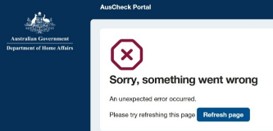
Error: ‘Sorry, something went wrong’
If you experience this error, double check your internet connection and try again. If that doesn’t resolve the issue, try refreshing your browser and logging into the portal again.
What should I do if I receive this error message?
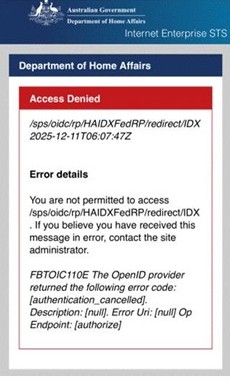
Error: ‘Access Denied’
If you experience this error, refresh your browser and log in again to the AusCheck applicant portal with your myID.
Tips for applicants using the online portal
Guidance for adding documents
Documents need to be in colour, clearly legible, with no parts of the document cut off.
Include both the front and back of any document that has stamps or writing on the back.
Each document must be in PDF or JPG/ JPEG formats.
The maximum file size is 4MB.
Original documents are required to complete your application. If you do not have an original document, contact the authorised issuer and obtain one before starting your application.
Tips to reduce your file size
If you’re taking a photo with your phone, the resolution may be too high. To reduce the resolution:
- iPhone: Go to Settings>Camera>Formats>Photo Mode and select 12MP. Then retake your photo.
- Android: If you see a label like 50M or 200M at the top of your camera screen, tap it to switch to 12M. Or open your camera settings and look for ‘Picture size’ or ‘Resolution’. Choose a lower option then retake your photo.
If you’re using a scanner, the resolution or format settings might be too high. To reduce the resolution:
- set your scanner resolution to 150-200 DPI
- if saving as a PDF, look for a ‘compressed’ or ‘small file size’ export option
- if your document has a front and back, save them as 2 separate files and upload them one at a time.
Reasons for needing to upload additional files:
- missing front or back of document
- wrong document uploaded
- image doesn’t show the full document
- blurry or illegible details.
More information:
I can’t access the portal
Unplanned outages may sometimes occur. Try again in 1-2 hours. For scheduled maintenance, please refer to current system updates.
If you still can’t access the portal after 2 hours, and there is no planned outage, contact us.
Include the following to help us progress your enquiry:
- your full name and contact details
- a screenshot of the error message
- date and time of the issue occurred
- the page the error was encountered.
Global Entry program applicants
Make sure you enter all the details in your application exactly as you have entered them on your United States Customs and Border Protection (USCBP) application. For example, do not add a hyphen or any different formatting to your name. Enter it exactly as you did on your USCBP application.
If you can’t access an application that you have started
If you do not complete your application in the AusCheck portal within 30 days, it will expire from our system.
Your application to the United States Customs and Border Protection (USCBP) for the Global Entry program and your Trusted Traveller Program (TTP) number remain valid.
You can restart an application for an AusCheck background check at any time by signing in to the AusCheck portal(Opens in a new tab/window) with your existing TTP number issued by the USCBP.
Please complete your application, including payment for the background check, within 30 days of restarting.
Western Australian applicants
‘Blocked driver’s license’
A block on a driver’s licence is a feature that protects the information on the driver's licence or permit. When a block is in place, the licence cannot be verified. Either remove the block(Opens in a new tab/window) from the licence or submit a different Category B document.
Birth certificate registration numbers
If you are unable to verify your birth certificate when submitting your application, you may need to change the format. Registration numbers must be 7 digits in length.
Format: 1234567X/YYYY (Birth certificates issued after 26 November 2001)
The registration number component is the first 7 digits. If there are less than 7 digits, add a zero to the beginning of the number.
Example:
- 1234567X/YYYY - Your registration number is 1234567
- 123456X/YYYY - Your registration number is 0123456
Format: 1/234/56X
The first section must contain 2 digits, and the middle section must contain 5 digits to make up the 7-digit registration number. If there are less than 2 digits in the first section, and less than 5 digits in the middle section, add zero/zeros to the beginning of each section.
Example:
- 1/234/56X – Your registration number is 0100234
Steps for completing a successful ASIC application through AusCheck
Tell us who you are
Provide your name, date of birth, address and citizenship. These details must be the same as those on your identity documents.
Tell us where you work
You will need to provide details about your employer, your manager, your job, and your operational need for an ASIC.
Prove your identity to a verifier
Select the location for an identity verification appointment. Once submitted, you will be advised which verifiers are linked to your chosen location. Contact a verifier to arrange an appointment. During the appointment, the verifier will confirm in person that your identity documents are genuine and valid. You must take the original identity documents listed in your application to the identity verification appointment.
Confirm you have the right to live and work in Australia
Correct document details are needed to ensure you have the right to live and work in Australia.
Acknowledge terms and conditions
You will need to read the terms and conditions and verify that you understand them and agree to them.
Additional help with your application
If you can’t find an answer to your question or you’re still unable to proceed with your application, please contact the AusCheck Service Centre.
If you can, include the following to help us progress your enquiry:
- a screenshot of the error message
- date and time the issue occurred
- the page the error was encountered
- your full name.
The more information you provide, the easier it will be for us to assist you. Our support team are ready to help with your application.